Many competition formats involve multiple rounds of play, between which players are often
substituted. Instead of running two independent Slam-In games for the first and second halves
and then having to enter all player names from scratch at the outset of the second half as well as
manually having to enter the results from the first half, you could instead:
1. Play the first half.
2. Suspend the game by clicking the "Setup" button.
3. Edit player names.
4. Resume the game.
5. Adjust/reset the Round Timer on-screen.
6. Click "Play Question".
This, of course, assumes that the point value, penalty, and timer settings are the same in both
halves. The point is that Slam-In offers you several different ways to achieve your objective.
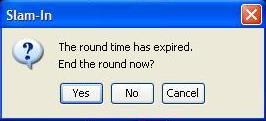
Note: In a timed match, when the Round Timer expires for the first half (or quarter or period), and
you are shown a dialog box offering you the opportunity to end the game, just say no! Don't do
it.
Instead, click "No", then click on the "Setup" button as described above. This suspends the
game, allowing you to keep all your settings - and your scores - so that you can simply resume
the game with the next half (or quarter or period). Remember to edit/reset the Round Timer
before clicking the "Play Question" button.